

Paragon System: Boards, Points and Legendary Nodes
Paragon levels, Season Rank points, rotating 5 boards, Legendary Nodes and Glyph sockets
The Paragon System at a Glance
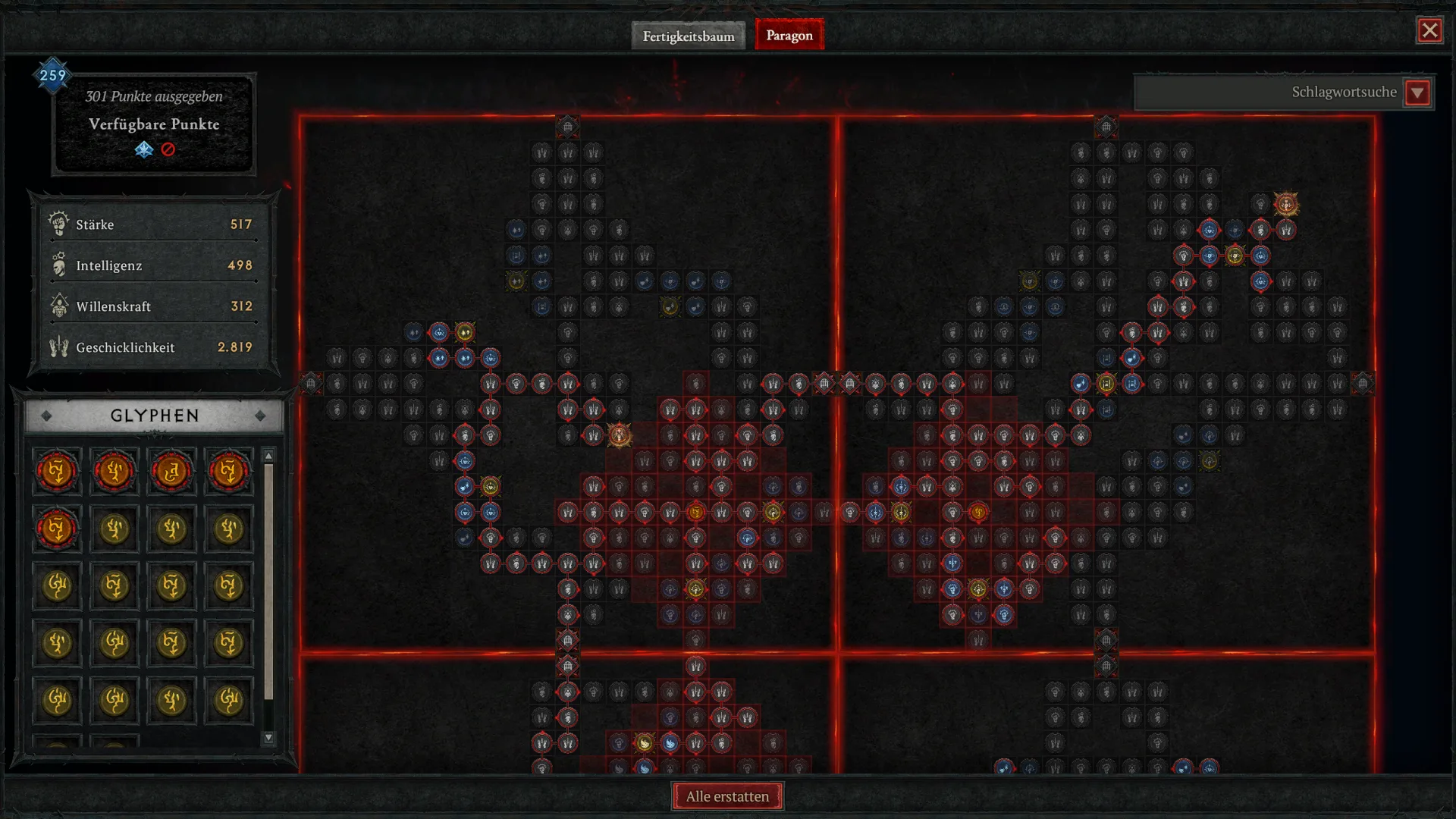
The Paragon system in Diablo 4 is your progression after level 70: every Paragon level gives you one point to spend on Paragon Boards. You can connect up to 5 boards including your starting board, and every additional board carries one Legendary Node and one Glyph socket. While leveling, Legendary Nodes come first, because your Glyphs only get strong once you have enough points.
| Question | Answer |
|---|---|
| When does it unlock? | After reaching max level 70 |
| Points per Paragon level | 1 |
| Max Paragon level | 300 |
| Bonus points in Season 15 | up to 42 from the Season Rank |
| Boards at once | 5 including the starting board |
| Boards to choose from | 9 per class plus the starting board |
| Glyphs | 1 socket per board, so up to 5 |
When does Paragon unlock and where do points come from?
The Paragon system unlocks once your character hits level 70. From then on your experience goes into Paragon levels instead of character levels. Each Paragon level grants exactly one Paragon point.
Leveling gives you up to 300 points. Since Vessel of Hatred, Paragon levels are shared by every character in a realm, so an alt in the same season doesn't start from zero.
Bonus points from the Season Rank
During a season you earn extra Paragon points through the Season Rank. In Season 15, Blizzard lists up to 42 Paragon points across the nine ranks. These points stack on top of your Paragon level.
How to gain Paragon levels quickly is covered in our news on Paragon leveling. Helltides are another strong source, see the Helltide route for reputation and Paragon XP.
How the Paragon system works
In the Paragon system, every class starts on its starting board. From there you work outward node by node: each node costs one point and has to touch a node you already unlocked. The top left of the Paragon screen shows how many points you've spent and how many are left.
| Node type | Color | What it gives |
|---|---|---|
| Normal node | gray | a small bonus to one core stat (Strength, Intelligence, Willpower, Dexterity) |
| Magic node | blue | slightly stronger bonuses, like damage or resistances |
| Rare node | yellow | several bonuses at once, like damage plus a core stat |
| Legendary Node | orange | a build-defining effect, only one per board |
| Glyph socket | red outline | holds a Glyph |
Each core stat helps your class in a different way. How stats and Paragon bonuses feed into your damage is explained in our guide to damage calculation.
Legendary Nodes: every board is named after one
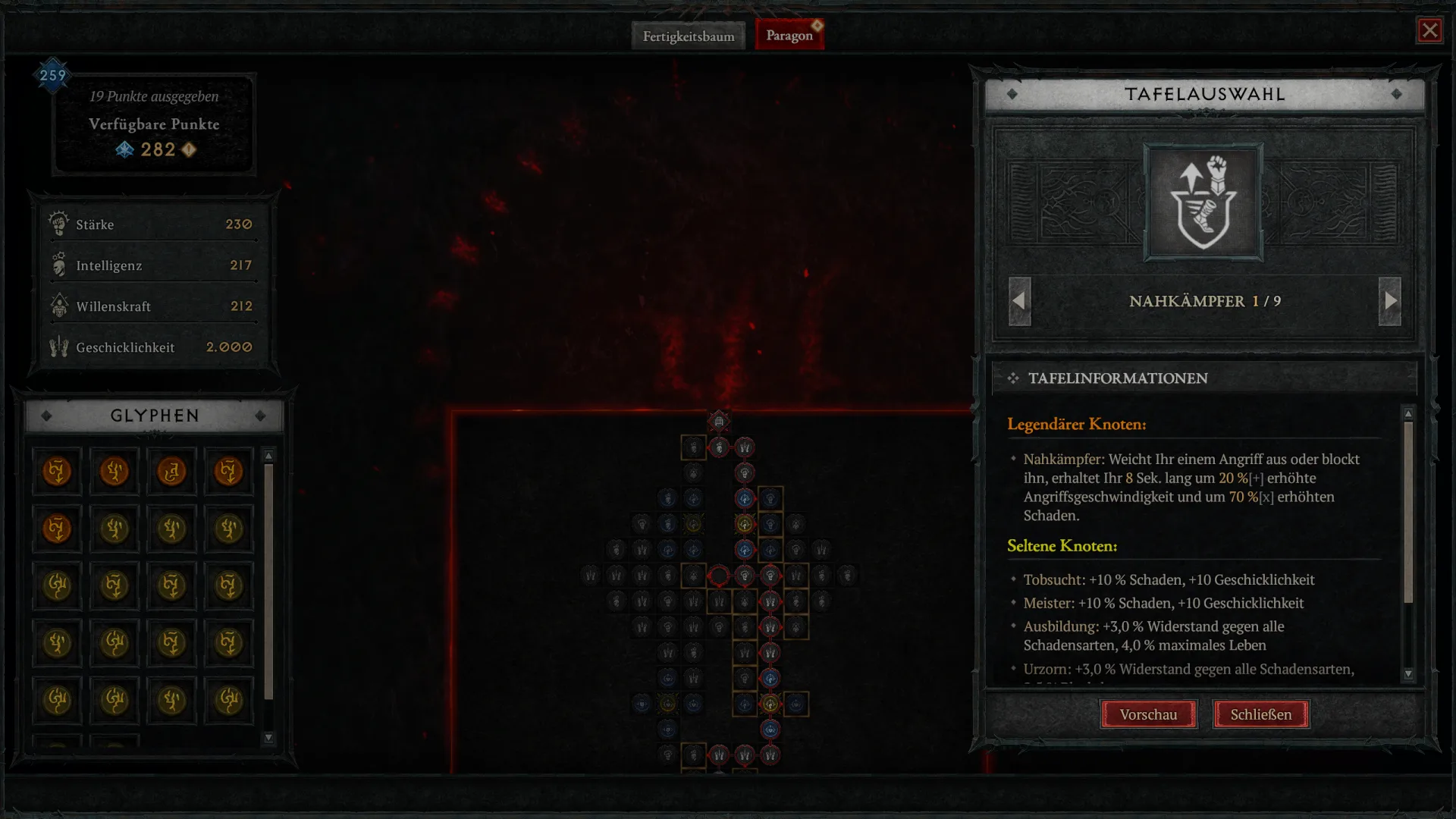
Apart from the starting board, every Paragon Board has exactly one Legendary Node, and the board carries that node's name. The Spiritborn board In-Fighter, for example, holds the In-Fighter Legendary Node. Each class has nine boards to choose from.
Before you attach a board, the board selection shows its Legendary Node and its rare nodes. Use the arrows to flip through all nine boards of your class and compare them before you commit.
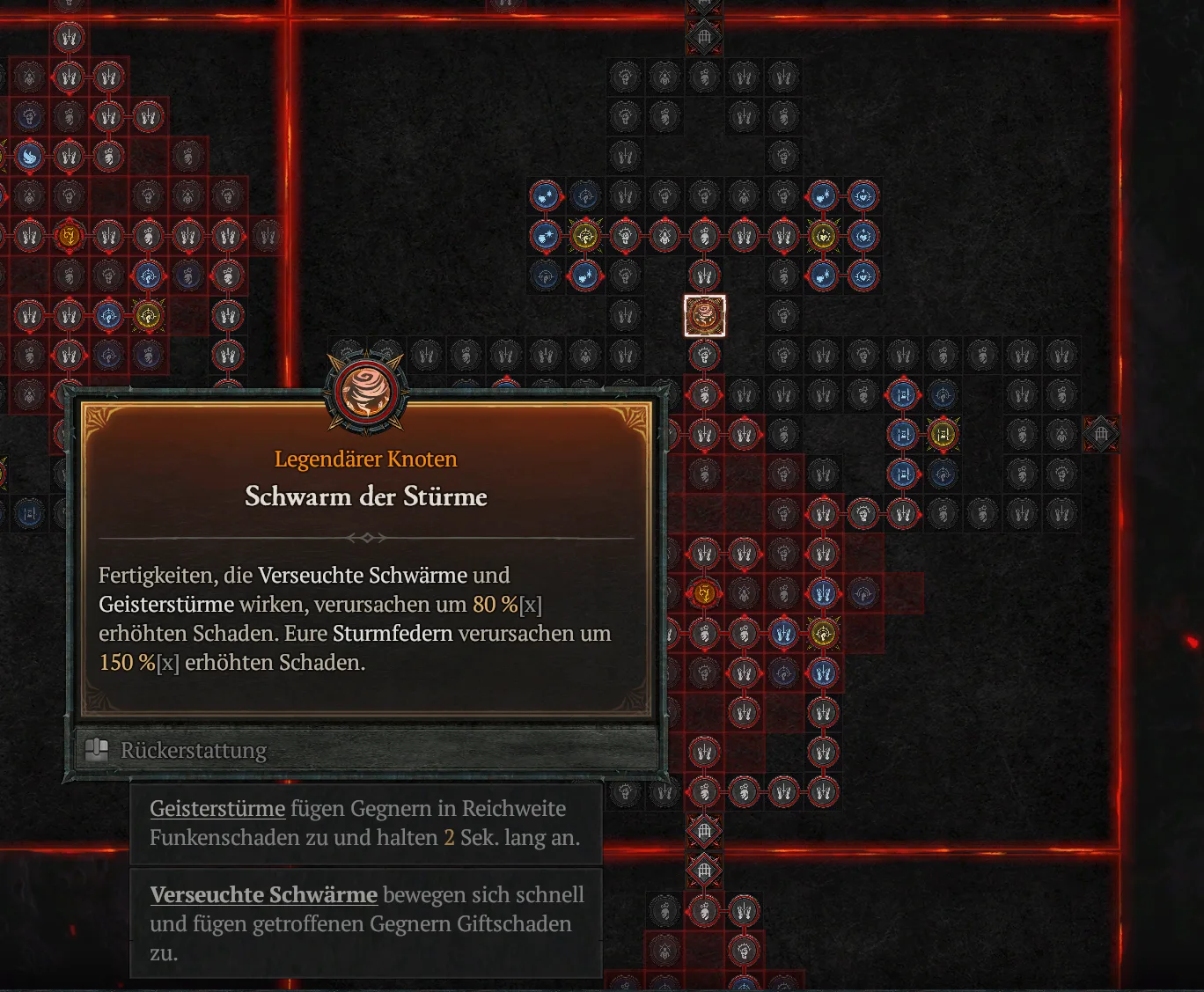
The Legendary Node is usually the reason to pick a board at all. Swarm of Storms, the new board from Season 15, for example, massively boosts the Spiritborn's Pestilent Swarm and Spirit Storm skills. You'll find every board with its effects in our Paragon Board database.
Attaching and rotating boards
Every board has gates along its edges. Once your path reaches a gate, you can attach a new board there. You can use 5 boards in total, and the starting board counts toward that limit.
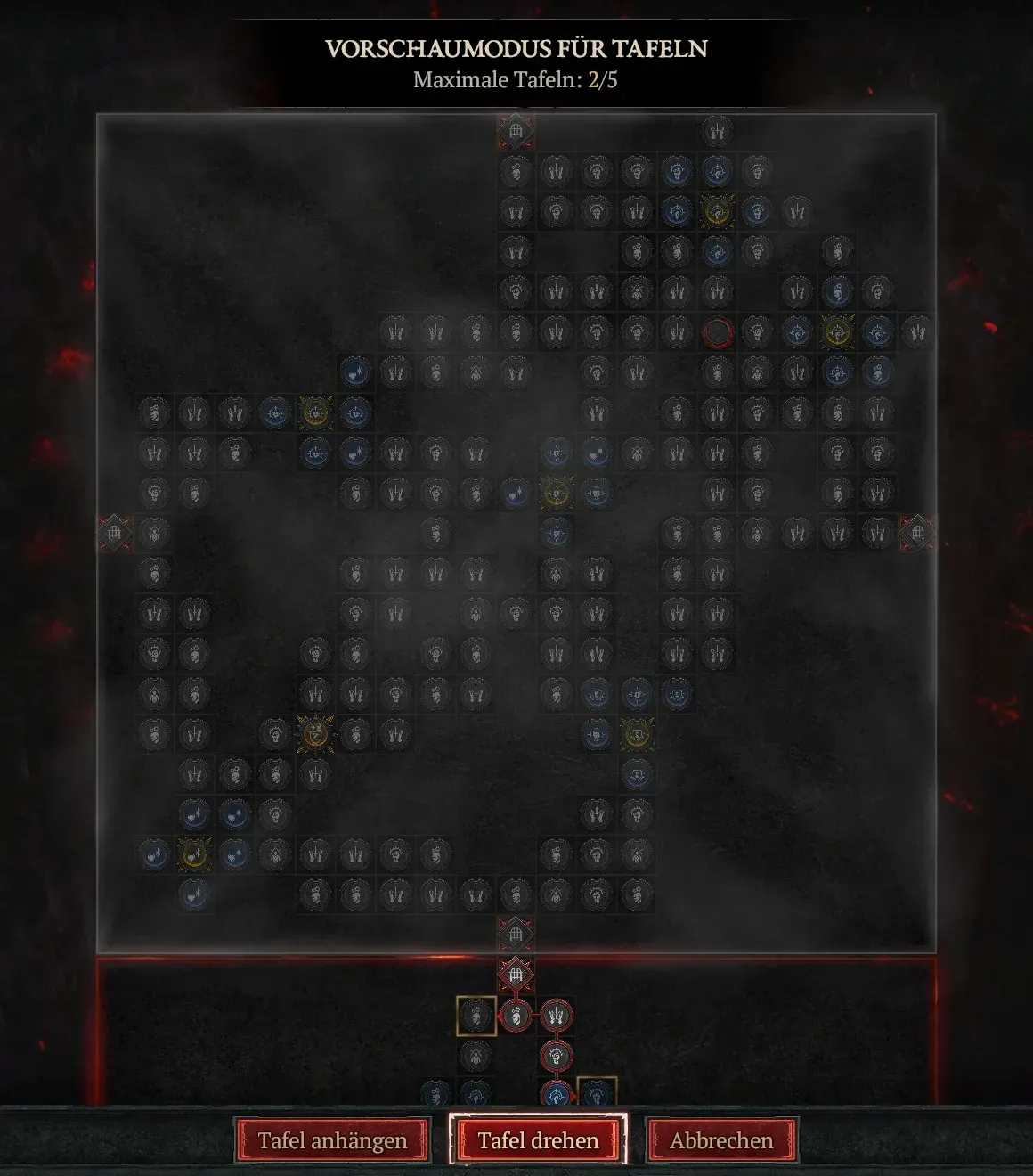
When you pick a board, the game opens a board preview. You can rotate the board in 90-degree steps until its Legendary Node and Glyph socket sit as close to your entry gate as possible. Only then do you attach it.
Glyph sockets: why Glyphs only shine later
Every board has one Glyph socket. A Glyph boosts the nodes within its radius, and its bonus depends on how much of the matching stat you've unlocked around the socket. Once you reach enough of that stat inside the radius, the Glyph also unlocks an additional bonus.
With five boards, the Paragon system lets you run up to five Glyphs. You upgrade them after runs in the Pit: every level makes the bonus stronger, and at certain levels the radius grows as well. Our guide on how to level Glyphs explains the details and which Glyphs are worth it. Every Glyph and its effects are listed in our Glyph database.
Level Glyphs: Radius, Legendary Level and Upgrade Order
Which boards fit your build?
Early on you have few points. That's why you head for the Legendary Nodes that carry your build first, and only fill out Glyph radiuses once you have points to spare.
This is why leveling and endgame planners often look very different. Compare them yourself:
The leveling build only runs two Glyphs, while the endgame build fills all five sockets. Try out boards, rotations, and Glyphs for your own setup in the build planner before spending points in game.
Step by step: your first Paragon points
- At level 70, open the Paragon screen through the Paragon tab next to the skill tree.
- Pick a build in the build planner first and note its boards in the right order.
- On the starting board, take the shortest path to the gate where your build's first board goes.
- Select that board, rotate it in the preview, and attach it.
- Grab the Legendary Node first before you put points into Glyph radiuses.
- Put a Glyph into every socket you reach, even if its radius isn't filled yet.
- Repeat this up to your fifth board, then fill out your Glyph radiuses.
Resetting your Paragon
You can refund single nodes or use "Refund All" at the bottom of the Paragon screen to reset everything at once. Do this whenever you switch builds instead of dragging old paths along.
If you swap between several builds regularly, save each Paragon setup with its Glyphs in the Armory. There you switch between up to five loadouts for free.
What comes after the Paragon system
Paragon runs alongside everything else in the endgame. Your next steps are leveling your Glyphs in the Pit and climbing the Torment tiers.
The Pit in Diablo 4: Unlock, Torment Tiers and Rewards
To see which Paragon nodes Season 15 added, read our news on all new Paragon nodes in Season 15.
Common Paragon System Mistakes
- Filling Glyphs too early: With few points, Legendary Nodes give you more than half-filled Glyph radiuses.
- Not rotating boards: A badly rotated board wastes a lot of points on detours.
- Copying an endgame Paragon too early: Endgame planners assume more than 300 points. With far fewer points, use the leveling version.
- Ignoring the Season Rank: The up to 42 bonus points equal 42 Paragon levels.
- Keeping old paths: After switching builds, refund everything and start fresh.
Paragon System FAQ
At what level does Paragon unlock?
How many Paragon points are there?
How many Paragon Boards can I use?
Can I rotate Paragon Boards?
Can I reset my Paragon?
Changelog
Sources
- The 2.0 PTR: What You Need to Know, Blizzard News, accessed October 22, 2026
- Celebrate 30 Years of Diablo in Season of Hell's Legacy, Blizzard News, accessed October 22, 2026
- Diablo IV Patch Notes (3.0), Blizzard News, accessed October 22, 2026
Comments
Login to comment.