
Diablo 4 Loot Filter Season 15: 4 Import Codes + Guide
Four ready-made loot filters to import (Light, Medium, Strict, Allround) and a guide that explains every rule.
Since Lord of Hatred, Diablo 4 has a built-in Loot Filter. It hides items, recolors them or shows them on purpose. Here you get four ready-made filters: Light, Medium, Strict and Allround. On PC you load them with an import code in under a minute, on console you rebuild them from the rule tables. Below that you find what every rule does and how to adapt the filter to your build.
Which filter for whom
All four filters share the same core: valuable items get recolored and protected. The only difference is how much junk disappears.
| Filter | Hides | For whom |
|---|---|---|
| Light | Common, Magic | Leveling, campaign, first steps into the endgame |
| Medium | Common, Magic, Rare | Regular endgame play from Torment 1 |
| Strict | additionally Legendary without Ancestral | Pit pushers, speed farmers with a finished build |
| Allround | all three tiers switchable via checkboxes | Everyone who only wants to set up one filter |
On PC you copy the code and import it. On PS5 and Xbox there is no import. There you create the rules from the table of the respective filter by hand, in exactly this order.
Before and after
Four pictures from the same session, same loot, once without and once with the filter (tier Medium).
How the filter works
- A filter has up to 25 rules. Every rule has conditions (which items) and a visibility: Show, Recolor, Hide Label or Hide All. Our filters use Show, Recolor and Hide All.
- Rules are checked from top to bottom. The first matching rule wins. The game calls it "descending order". That is why protection rules sit at the top and hide rules at the bottom.
- An item has to meet all conditions of a rule (AND). For "or" you need two rules.
- The filter only affects equipment. Materials, gems, gold and Tempering Manuals always stay visible.
- Hidden items still lie on the ground. You can still pick them up.
- A rule without a condition matches every item. Never leave an empty Hide rule in place.
Import in four steps (PC)
- Copy the whole code below.
- In the game press Esc and choose "Loot Filter" in the game menu.
- Click "New Filter", choose "Import Loot Filter" in the window, press "Import Code" and confirm.
- Click "Save Changes" and select the filter in the dropdown. Without this step nothing happens.
The colors
| Color | Meaning | Rule |
|---|---|---|
| Pink | Mythic Unique | 1 |
| Cyan | at least one Greater Affix | 3 |
| Red | Codex Upgrade (the aspect improves your Codex of Power) | 4 |
| Gold | item carries several of your build affixes | 5 |
| no color, visible | Talismans, Uniques, Ancestral items | 2, 6, 7 |
Pink has priority: a Mythic item stays pink even with a Greater Affix, because rule 1 fires first. Uniques keep their default color; if a Unique has a Greater Affix, it turns cyan.
The shared core: rules 1 to 7
All four filters start with the same seven rules. They only differ from rule 8 on. The number in front of every rule name in the game is the same as here in the table. Talismans sit on position 2 on purpose: this way no Hide rule below can catch a Charm or a Seal, whatever its rarity or item power.
| No. | Rule | Visibility | Condition |
|---|---|---|---|
| 1 | Mythic | Recolor, pink | Item Rarity Match: Mythic Unique |
| 2 | Show Talismans | Show | Item Type Match: Charm, Horadric Seal |
| 3 | Greater Affixes | Recolor, cyan | Selection: Greater Affixes, requires at least 1 |
| 4 | Codex Upgrade | Recolor, red | Selection: Codex Upgrade, box checked |
| 5 | Build Affixes | Recolor, gold | Has Required Affixes: list below, requires at least 2 |
| 6 | Show Uniques | Show | Item Rarity Match: Unique |
| 7 | Show Ancestral | Show | Item Properties: Ancestral |
Chrix Loot Filter Light
For leveling, the campaign and the first steps into the endgame. Hides only Common and Magic items.
| No. | Rule | Visibility | Condition |
|---|---|---|---|
| 8 | Hide Junk | Hide All | Item Rarity Match: Common, Magic |
CiAKDzEgTXl0aGljIChwaW5rKRACHcgA//8iBAgBICAoAQopChAyIFNob3cgVGFsaXNtYW5zEAAdAAD//yIMCAUVgH4jABUF7SIAKAEKKwoYMyBHcmVhdGVyIEFmZml4ZXMgKGN5YW4pEAId5v8A/yIGCAQgATABKAEKJgoVNCBDb2RleCBVcGdyYWRlIChyZWQpEAIdKCj//yIECAMwASgBCk8KFjUgQnVpbGQgQWZmaXhlcyAoZ29sZCkQAh0AyP//IiwIBhXS6hsAFdTqGwAVxuobABWA/BsAFdjqGwAVsuobABU4/RsAFd7qGwAgAigBCh8KDjYgU2hvdyBVbmlxdWVzEAAdAAD//yIECAEgECgBCiEKEDcgU2hvdyBBbmNlc3RyYWwQAB0AAP//IgQIAiAEKAEKHAoLOCBIaWRlIEp1bmsQAx0AAP//IgQIASADKAESF0Nocml4IExvb3QgRmlsdGVyIExpZ2h0GAMgAw==
Chrix Loot Filter Medium
For regular endgame play from Torment 1. Hides Common, Magic and Rare items. All Legendary items stay visible.
| No. | Rule | Visibility | Condition |
|---|---|---|---|
| 8 | Hide Junk | Hide All | Item Rarity Match: Common, Magic, Rare |
CiAKDzEgTXl0aGljIChwaW5rKRACHcgA//8iBAgBICAoAQopChAyIFNob3cgVGFsaXNtYW5zEAAdAAD//yIMCAUVgH4jABUF7SIAKAEKKwoYMyBHcmVhdGVyIEFmZml4ZXMgKGN5YW4pEAId5v8A/yIGCAQgATABKAEKJgoVNCBDb2RleCBVcGdyYWRlIChyZWQpEAIdKCj//yIECAMwASgBClUKFjUgQnVpbGQgQWZmaXhlcyAoZ29sZCkQAh0AyP//IiwIBhXS6hsAFdTqGwAVxuobABWA/BsAFdjqGwAVsuobABU4/RsAFd7qGwAgAiIECAEgCCgBCh8KDjYgU2hvdyBVbmlxdWVzEAAdAAD//yIECAEgECgBCiEKEDcgU2hvdyBBbmNlc3RyYWwQAB0AAP//IgQIAiAEKAEKHAoLOCBIaWRlIEp1bmsQAx0AAP//IgQIASAHKAESGENocml4IExvb3QgRmlsdGVyIE1lZGl1bRgDIAM=
Chrix Loot Filter Strict
For Pit pushers and speed farmers with a finished build. Only pink, cyan, red, gold, Ancestral items and Talismans stay visible.
| No. | Rule | Visibility | Condition |
|---|---|---|---|
| 1b | Hide non-Ancestral Charms (off on import) | Hide All | Item Type Match: Charm, plus Item Properties: None |
| 2b | Hide non-Ancestral Uniques (off on import) | Hide All | Item Rarity Match: Unique, plus Item Properties: None |
| 8 | Hide Junk | Hide All | Item Rarity Match: Common, Magic, Rare |
| 9 | Hide Legendary | Hide All | Item Rarity Match: Legendary |
Ancestral Legendaries are protected by rule 7 further up, they stay visible. Rules 1b and 2b are switched off on import. Tick them, and only Ancestral Charms and Uniques stay visible (Horadric Seals always stay); together with rule 9 that means Ancestral only. Rule 1b has to sit above rule 2, because otherwise rule 2 shows every Talisman before 1b fires. Same for Greater Affixes (rule 3) and Codex Upgrades (rule 4).
CiAKDzEgTXl0aGljIChwaW5rKRACHcgA//8iBAgBICAoAQowChYxYiBIaWRlIG5vbi1BbmMgQ2hhcm1zEAMdAAD//yIHCAUVgH4jACIECAIgASgACikKEDIgU2hvdyBUYWxpc21hbnMQAB0AAP//IgwIBRWAfiMAFQXtIgAoAQouChcyYiBIaWRlIG5vbi1BbmMgVW5pcXVlcxADHQAA//8iBAgBIBAiBAgCIAEoAAorChgzIEdyZWF0ZXIgQWZmaXhlcyAoY3lhbikQAh3m/wD/IgYIBCABMAEoAQomChU0IENvZGV4IFVwZ3JhZGUgKHJlZCkQAh0oKP//IgQIAzABKAEKWwoWNSBCdWlsZCBBZmZpeGVzIChnb2xkKRACHQDI//8iLAgGFdLqGwAV1OobABXG6hsAFYD8GwAV2OobABWy6hsAFTj9GwAV3uobACACIgQIASAIIgQIAiAEKAEKHwoONiBTaG93IFVuaXF1ZXMQAB0AAP//IgQIASAQKAEKIQoQNyBTaG93IEFuY2VzdHJhbBAAHQAA//8iBAgCIAQoAQocCgs4IEhpZGUgSnVuaxADHQAA//8iBAgBIAcoAQohChA5IEhpZGUgTGVnZW5kYXJ5EAMdAAD//yIECAEgCCgBEhhDaHJpeCBMb290IEZpbHRlciBTdHJpY3QYAyAD
Chrix Loot Filter Allround
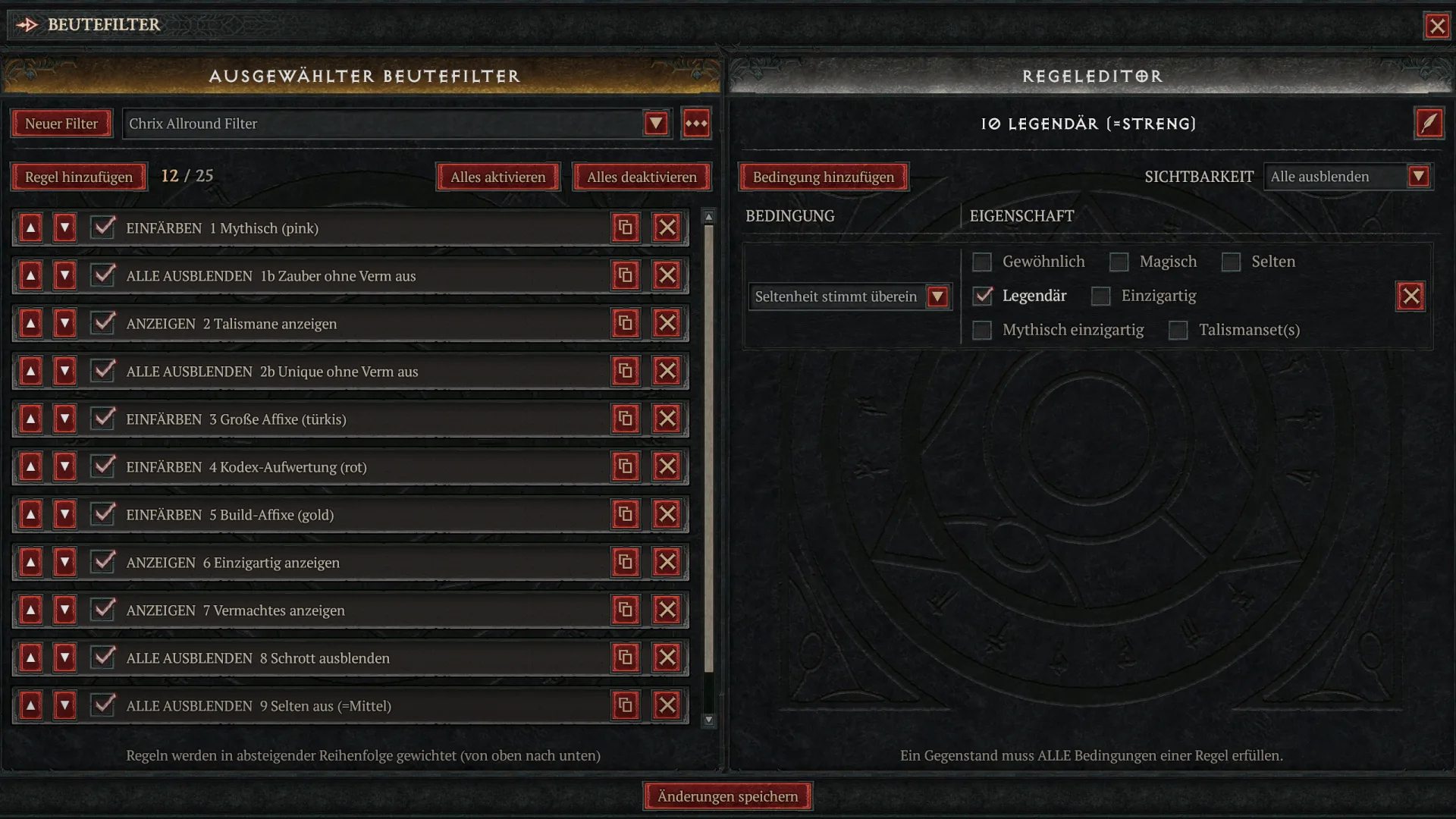
One filter for everything. It contains all hide rules, four of them are switched off on import. You switch them on or off with the checkbox on the rule and change tiers this way without importing again. Rules 1b and 2b are the extra tier for endgame players who only want to see Ancestral Charms and Uniques. Horadric Seals are not affected. Rule 5 (gold) is set up like in Strict here: Ancestral Legendaries only. This way no Legendary without Ancestral status is left standing in the Strict position. While leveling nothing lights up gold because of that; if you want that, use the Light filter instead. In the game this filter is called "Chrix Allround Filter", because filter names are limited to 25 characters.
| No. | Rule | Visibility | Condition | On import | Result |
|---|---|---|---|---|---|
| 1b | Hide non-Ancestral Charms | Hide All | Item Type Match: Charm, plus Item Properties: None | off | on = Ancestral Charms only; Horadric Seals always stay visible |
| 2b | Hide non-Ancestral Uniques | Hide All | Item Rarity Match: Unique, plus Item Properties: None | off | on = Ancestral Uniques only; together with 1b, 9 and 10: Ancestral only |
| 8 | Hide Junk | Hide All | Item Rarity Match: Common, Magic | on | Light |
| 9 | Hide Rare (=Medium) | Hide All | Item Rarity Match: Rare | off | on = Medium |
| 10 | Legendary (=Strict) | Hide All | Item Rarity Match: Legendary | off | on = Strict |
CiAKDzEgTXl0aGljIChwaW5rKRACHcgA//8iBAgBICAoAQowChYxYiBIaWRlIG5vbi1BbmMgQ2hhcm1zEAMdAAD//yIHCAUVgH4jACIECAIgASgACikKEDIgU2hvdyBUYWxpc21hbnMQAB0AAP//IgwIBRWAfiMAFQXtIgAoAQouChcyYiBIaWRlIG5vbi1BbmMgVW5pcXVlcxADHQAA//8iBAgBIBAiBAgCIAEoAAorChgzIEdyZWF0ZXIgQWZmaXhlcyAoY3lhbikQAh3m/wD/IgYIBCABMAEoAQomChU0IENvZGV4IFVwZ3JhZGUgKHJlZCkQAh0oKP//IgQIAzABKAEKWwoWNSBCdWlsZCBBZmZpeGVzIChnb2xkKRACHQDI//8iLAgGFdLqGwAV1OobABXG6hsAFYD8GwAV2OobABWy6hsAFTj9GwAV3uobACACIgQIASAIIgQIAiAEKAEKHwoONiBTaG93IFVuaXF1ZXMQAB0AAP//IgQIASAQKAEKIQoQNyBTaG93IEFuY2VzdHJhbBAAHQAA//8iBAgCIAQoAQocCgs4IEhpZGUgSnVuaxADHQAA//8iBAgBIAMoAQomChU5IEhpZGUgUmFyZSAoPU1lZGl1bSkQAx0AAP//IgQIASAEKAAKJwoWMTAgTGVnZW5kYXJ5ICg9U3RyaWN0KRADHQAA//8iBAgBIAgoABIVQ2hyaXggQWxscm91bmQgRmlsdGVyGAMgAw==
Adapting to your build
Rule 5 is the only place you have to touch, and you should. The eight allround affixes are a starting point, not build knowledge: they contain neither your main stat nor your resource nor the ranks of your core skill. Out of the box, gold only means "decent allround stats", not "good for my build". Open the rule, throw out the affixes your build does not need and enter the affixes you want: main stat, resource, ranks of your core skill. Minimum 2 is deliberately loose because the filter is meant for all classes. Once you have entered your three wanted affixes you can go up to 3, then only the perfect item lights up. For a second build, duplicate the filter via the three-dot menu. New rules land at the top of the list; move them to the right spot with the arrows.
Main stat per class for rule 5:
| Class | Main stat |
|---|---|
| Barbarian | Strength |
| Sorcerer | Intelligence |
| Necromancer | Intelligence |
| Druid | Willpower |
| Rogue | Dexterity |
| Spiritborn | Dexterity |
| Paladin | Strength |
| Warlock | Willpower |
In the affix window you only see the affixes of your current class by default; "Show All Classes" reveals the rest. Skill ranks of your core skill are listed under "Versatility" as "+[#] to …".
Three more rules are worth it, depending on your goal:
| Purpose | Visibility | Condition | Where to put it |
|---|---|---|---|
| Target Uniques of your build | Recolor, any color | Is Specific Unique: your Uniques | at the very top, above rule 1 |
| Hide a finished slot | Hide All | Item Type Match: for example Boots, plus Item Rarity Match: Legendary | below rule 7 |
| Talisman set of your build | Recolor, any color | Talisman Set Bonus: your set | at the very top, above rule 1 |
| See Ancestral Uniques only | Hide All | Item Rarity Match: Unique, plus Item Properties: None | directly below rule 2, above Greater Affixes |
| See specific Talismans only | Hide All | Item Type Match: Charm, Horadric Seal | instead of rule 2, with the set rule above it |
Greater Affixes and Ancestral items in the hidden slot stay visible because rules 3 and 7 sit higher. The Unique rule has to sit above rule 3, otherwise cyan recolors an 850 Unique with a Greater Affix before it gets hidden; Mythics stay pink and Talismans visible because rules 1 and 2 fire first. Talismans run on item type, not rarity: rule 2 shows all Charms and Horadric Seals, whatever their rarity. If you only hunt one specific set, recolor it with "Talisman Set Bonus" and hide the rest of the Talismans below it.
Checklist after the import
- "Save Changes" clicked and filter selected in the dropdown
- Rule 1 sits at the very top
- Hide rules sit at the very bottom
- Rule 5 contains the affixes of your build
- Allround and Strict: rules 1b, 2b, 9 and 10 are set the way you need them
Comments
Login to comment.